Quick answer: To start a podcast, you need your phone for recording, Adobe Podcast Enhance Speech for free audio cleanup, Spotify for Creators for free hosting, your transcript for show notes, and Pinterest plus an email list for promotion. AI is worth it for cleanup and formatting, and your stories stay yours.
Picture my 2008 hybrid parked in our dark, uninsulated Wisconsin garage in November. Two Target throw pillows were balanced over the steering wheel, I was freezing my butt off in the front seat, and I had decided I wasn’t getting out until I recorded my first podcast episode.
So hiiiiii, and if there’s an idea you keep talking yourself out of, grab a throw pillow and settle in.
How I recorded my first podcast episode in a parked car
Years before that night, my older brother handed me a nice little padded mic he’d bought for a school project and told me I should start a podcast. I laughed in his face and said I’d run out of things to say after eight episodes. When I finally decided to try, I couldn’t figure out how to plug that mic into my computer and get my computer to read it, and that part alone paralyzed me more than speaking ever did. (To this day I have a box of cords in my office and I don’t even know what they’re for, plus a few I ordered wrong on Amazon and never sent back, because returns are the death of me.)
So I grabbed my iPhone earbuds instead. We had two very small rescue terriers who loved to bark and tell the world they were bigger than their 10-pound bodies, so the house was out and the car was in. I pressed record and talked into my earbuds in my best “phone voice” for one hour, smelling the leather seats and wondering if I’d say “um” eight million times, while those throw pillows muffled the echo off the dashboard. Then I went inside for soup, laughing about the ordeal with Drew.
That one hour became the first episode of The Goal Digger Podcast, a show that ran for 968 episodes and reached over 115 million downloads. (My eight-episode prediction missed by more than 900, whoops.)
My last episode dropped with the new year (I wrote about what that new chapter looks like if you’re curious), and now I get to watch the podcasting world like a nosy neighbor. In January, Edison Research asked Americans about their listening, and 58% of people 12 and up, about 167 million of them, had listened to or watched a podcast in the past month. The month I hung up my headphones, a bigger share of Americans than ever was pressing play. I mean, come on.
Do you need expensive equipment to start a podcast?
No, you don’t need expensive equipment to start a podcast. A phone in a quiet-ish corner can sound better than my first episode did, and my students prove it, recording on their phones in the school pickup line or in a home office with kids in the next room.
What I see beginning podcasters struggle with most is wanting to make all the right, perfect decisions before they even start, so they research gear until the idea goes cold. You get to make decisions without making perfect ones, because every one of them can change later. Choose what sounds best right now and start recording, so you find out whether you love it before you spend the time, energy, and money on the perfect setup.
When you’re ready to shop, I walk you through all of it, what you need and what you don’t, in my free Podcasting 101 masterclass. Show up live and my Ultimate Podcasting Equipment Guide with the full breakdown, mic by mic, price tier by price tier, is yours too.
What tools do you need to start a podcast in 2026?
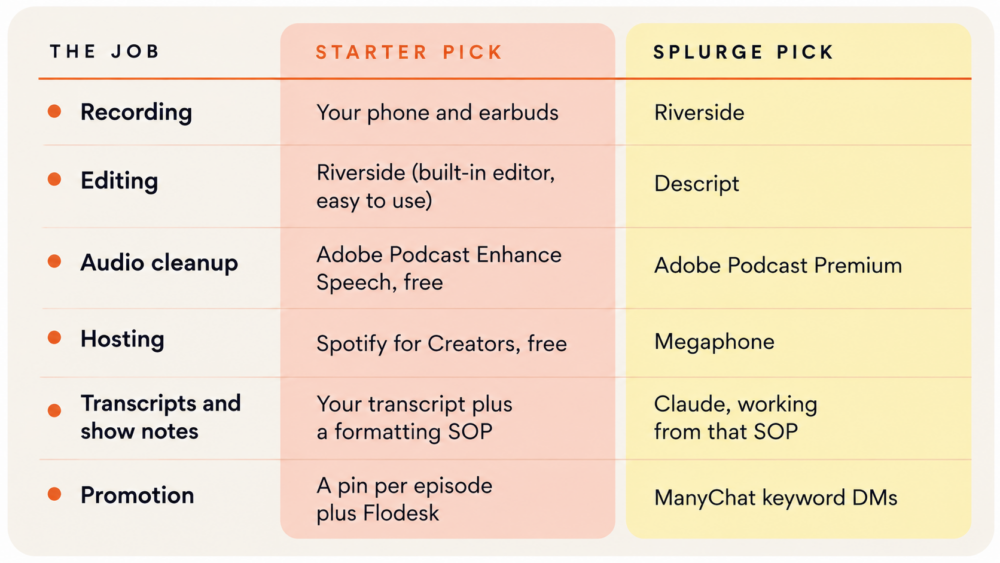
To start a podcast in 2026, you need one tool for each of six jobs: recording, editing, audio cleanup, hosting (the service that sends your show to Apple Podcasts and Spotify), transcripts and show notes, and promotion. Your phone can handle the recording, and every other job has a free starter option.
What should you buy first to start a podcast on a budget?
- If you have $0, you can record on your iPhone with the earbuds already sitting in your junk drawer. That’s exactly how my first episode happened, throw pillows and all.
- If you have $100, I’d buy a plug-and-play Blue Snowball USB mic for about $50, which the me in that garage would have loved. I’d put the other $50 toward a month of Claude or Adobe Podcast Premium.
- If you have $500, I’d rebuild the setup most of Goal Digger was recorded on, a Shure mic, a Behringer audio interface, and a foam recording box, for about $250. Then I’d spend what’s left on Riverside and Claude.
My best podcast tools list, organized by job
1. Recording with your phone, then Riverside
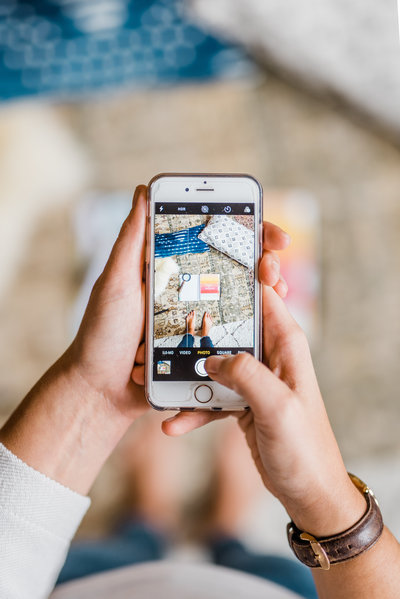
Your phone is the recording tool you never have to set up, and it’s also the backup that saves an episode when everything else fails. I recorded an amazing episode with my momma in real life, and at some point the microphones disconnected, but I’d been recording a backup on my phone and the phone audio worked. That same phone records my 7-year-old’s weekly “podcasts” of her favorite books read aloud, and she sounds like she’s in a recording studio.
Here’s how I’d use it: Record on whatever you have and run a backup on your phone every time. Once you start interviewing guests, a tool like Riverside is worth it. We used Zencastr for years before switching to Riverside, which records each person on their own device, so a guest’s spotty wifi doesn’t wreck your audio. And before you record anything, plan your first handful of episodes (my list of podcast topic ideas will get you there fast).
2. Editing with Riverside, or Descript if you want more control
Riverside already earns its spot once you’re recording with guests, and it does double duty on editing, letting you trim and clean up a conversation without touching a separate program. If you want more control, especially editing by deleting words right off the transcript instead of hunting through a timeline, Descript is worth the learning curve.
Here’s how I’d use it: Start in whatever tool you’re already recording in, and only add a second editing tool once you’re spending real time cutting episodes down. Most beginner episodes need way less editing than you think, a few “ums” trimmed and a stronger open, not a full production.
3. Audio cleanup with Adobe Podcast Enhance Speech
Adobe Podcast Enhance Speech is an AI tool that strips the echo and background noise out of a rough recording, so your quiet-ish corner comes back sounding like a studio. I love this tool because it’s saved me more than a few times, and it works awesome.
Here’s how I’d use it: Start with the free version, which handles audio files up to 30 minutes with about an hour of enhancement a day. If your episodes run longer, Premium takes files up to two hours and lets you dial the strength back so you still sound like yourself.
4. Hosting with Spotify for Creators, then Megaphone
Your podcast host stores your episodes and creates the RSS feed that every podcast app pulls from, so this is the one tool you can’t skip. Goal Digger lives on Megaphone, which is built and priced for established shows with big back catalogs, so save that one for later.
Here’s how I’d use it: Get started on Spotify for Creators, formerly Spotify for Podcasters, which is free with unlimited storage, and then submit your feed to Apple Podcasts yourself in one quick step.
5. Transcripts, the most underrated part of my workflow
Transcripts made podcasting so much easier for me, because one transcript gives you your top clips, your show notes, and the content for your emails. We pulled our transcripts, created a formatting SOP (the layout our show notes followed every week), and only then brought in Claude to turn each transcript into show notes.
Here’s how I’d use it: Take time to get familiar with your transcripts before you add anything else, and write your SOP first so the AI follows your format instead of inventing one. A saved Claude skill will remember that format for you every week, and my post on Claude skills for business walks through how to set one up.
6. Promotion with Pinterest, Flodesk, and ManyChat
A Pin can send listeners to an episode for years, and an email lands in your listener’s inbox whether or not an app decides to show her your post, which is why I’d put my promotion energy into those two first. Flodesk is our recommendation for the email side.
Here’s how I’d use it: make one Pin for every episode that links to its show notes, and give listeners one clear reason per episode to join your list. When you’re ready to splurge, ManyChat lets listeners comment a keyword on Instagram and get the episode link sent to their DMs. You can use the code “JENNA” to test it out for 30-days risk-free!
My podcast workflow if I were recording episode one tomorrow
If I were starting over tomorrow, here’s my entire workflow from idea to inbox:
- Outline three to five talking points, not a script.
- Record on my phone, or on Riverside if I have a guest.
- Edit the conversation down in Riverside, or Descript if it needs more work.
- Run the audio through Adobe Podcast Enhance Speech.
- Upload the episode to Spotify for Creators.
- Pull the transcript.
- Give Claude my show notes SOP and the transcript, then edit what comes back.
- Make one Pinterest Pin that links to the show notes.
- Email my list about the new episode.
That’s it, and then I’d set a reminder for 90 days out to look at my tools again. Once you have a system and a flow down, stick with it until you’ve outgrown it instead of chasing every new app.
Which AI tools are worth it for podcasters?
The AI tools worth it for podcasters are the ones that save time on podcast production without touching your voice: Adobe Podcast Enhance Speech to clean up your audio, and Claude to turn a transcript into show notes in your format. Skip any tool that promises to write your episodes for you.
AI can never touch your voice, your experience, and your stories. It can give you information, and information can be interesting, but your personal stories are what make the information useful.
So AI gets the jobs that happen around an episode, the ones nobody presses play for. It can clean up my audio when a recording sounds like it happened in a parked car (hi, it’s me), dig through a transcript for the moments worth clipping, or line my show notes up with the SOP my team already wrote. I’ll even let it turn something I’ve already said into an email or a caption, because the idea came out of my mouth first.
What AI doesn’t get is the part you’re tuning in for. It doesn’t get to decide what I believe or hand me a story I never lived. It definitely doesn’t get to write an episode and slap my name on it. When you hear my voice in your earbuds, you’re trusting that the stories are mine and the opinions are mine, and that trust is where the connection in podcasting comes from, so I’m not trading it for a few saved hours.
I want AI removing the work around my voice, not removing my voice from the work.
Frequently asked questions about podcast tools
Can I record a podcast on my phone? Yes, you can record a podcast on your phone. A phone and a pair of earbuds in a quiet corner are enough for your first episode, and a free tool like Adobe Podcast Enhance Speech can remove echo and background noise so it sounds closer to a studio recording.
How much does it cost to start a podcast? You can start a podcast for $0 by recording on your phone, cleaning up the audio with Adobe Podcast Enhance Speech’s free version, and hosting on Spotify for Creators, which is free. Most people add a microphone or a paid tool once they know they want to keep going.
What is the best free podcast hosting? Spotify for Creators is a strong free option for beginners because it offers unlimited storage and creates an RSS feed you can submit to Apple Podcasts. Established shows with large back catalogs often move to a paid host like Megaphone.
Is Adobe Podcast free? Yes, Adobe Podcast Enhance Speech has a free version that handles audio files up to 30 minutes, with about an hour of enhancement a day. Premium raises that to two hours per file and adds controls for how strong the cleanup sounds.
How do I use AI for podcasting? Use AI for the tasks around your episode, like cleaning up audio with Adobe Podcast Enhance Speech and turning your transcript into show notes with a tool like Claude. Keep your ideas, stories, and on-mic voice your own.
What’s the easiest podcast workflow for beginners? Outline three to five talking points, record on your phone, edit the conversation down, clean the audio with Adobe Podcast Enhance Speech, upload to a free host like Spotify for Creators, turn your transcript into show notes, make one Pinterest Pin, and email your list. Reassess your tools after about 90 days.
How often should I change my podcast tools? Reassess your podcast tools about 90 days after you launch and again at one year. Until then, stick with a system that works until you’ve outgrown it.
Start with what’s already on your desk
All I had in that cold garage was a pair of iPhone earbuds, two throw pillows from Target, and a decision not to get out of the car until I’d hit record, and it was enough to start a show people are still finding today. Whatever is sitting on your desk right now is enough too.
Once your tools are sorted and you’re recording, The Podcast Lab is where I’d send you next, it’s the system for turning a handful of episodes into a show people come back for.
When you’re ready to see how the pieces fit together, join my free masterclass, Podcasting 101: How to Start, Grow, and Profit from Your Show. Everyone who attends gets my exact gear list from nearly a decade of recording The Goal Digger Podcast, sorted from a starter budget all the way up to the splurge. Join the free masterclass here →